Simple OAuth2 with Password and Bearer
Now let's build from the previous chapter and add the missing parts to have a complete security flow.
Get the username and password
Section titled “Get the username and password”We are going to use FastAPI security utilities to get the username and password.
OAuth2 specifies that when using the "password flow" (that we are using) the client/user must send username and password fields as form data.
And the spec says that the fields have to be named like that. So user-name or email wouldn't work.
But don't worry, you can show it as you wish to your final users in the frontend.
And your database models can use any other names you want.
But for the login path operation, we need to use these names to be compatible with the spec (and be able to, for example, use the integrated API documentation system).
The spec also states that the username and password must be sent as form data (so, no JSON here).
The spec also says that the client can send another form field "scope".
The form field name is scope (in singular), but it is actually a long string with "scopes" separated by spaces.
Each "scope" is just a string (without spaces).
They are normally used to declare specific security permissions, for example:
users:readorusers:writeare common examples.instagram_basicis used by Facebook / Instagram.https://www.googleapis.com/auth/driveis used by Google.
Code to get the username and password
Section titled “Code to get the username and password”Now let's use the utilities provided by FastAPI to handle this.
OAuth2PasswordRequestForm
Section titled “OAuth2PasswordRequestForm”First, import OAuth2PasswordRequestForm, and use it as a dependency with Depends in the path operation for /token:
from typing import Annotated

from fastapi import Depends, FastAPI, HTTPException, status
from fastapi.security import OAuth2PasswordBearer, OAuth2PasswordRequestForm
from pydantic import BaseModel

fake_users_db = {
    "johndoe": {
        "username": "johndoe",
        "full_name": "John Doe",
        "email": "johndoe@example.com",
        "hashed_password": "fakehashedsecret",
        "disabled": False,
    },
    "alice": {
        "username": "alice",
        "full_name": "Alice Wonderson",
        "email": "alice@example.com",
        "hashed_password": "fakehashedsecret2",
        "disabled": True,
    },
}

app = FastAPI()


def fake_hash_password(password: str):
    return "fakehashed" + password


oauth2_scheme = OAuth2PasswordBearer(tokenUrl="token")


class User(BaseModel):
    username: str
    email: str | None = None
    full_name: str | None = None
    disabled: bool | None = None


class UserInDB(User):
    hashed_password: str


def get_user(db, username: str):
    if username in db:
        user_dict = db[username]
        return UserInDB(**user_dict)


def fake_decode_token(token):
    # This doesn't provide any security at all
    # Check the next version
    user = get_user(fake_users_db, token)
    return user


async def get_current_user(token: Annotated[str, Depends(oauth2_scheme)]):
    user = fake_decode_token(token)
    if not user:
        raise HTTPException(
            status_code=status.HTTP_401_UNAUTHORIZED,
            detail="Not authenticated",
            headers={"WWW-Authenticate": "Bearer"},
        )
    return user


async def get_current_active_user(
    current_user: Annotated[User, Depends(get_current_user)],
):
    if current_user.disabled:
        raise HTTPException(status_code=400, detail="Inactive user")
    return current_user


@app.post("/token")
async def login(form_data: Annotated[OAuth2PasswordRequestForm, Depends()]):
    user_dict = fake_users_db.get(form_data.username)
    if not user_dict:
        raise HTTPException(status_code=400, detail="Incorrect username or password")
    user = UserInDB(**user_dict)
    hashed_password = fake_hash_password(form_data.password)
    if not hashed_password == user.hashed_password:
        raise HTTPException(status_code=400, detail="Incorrect username or password")

    return {"access_token": user.username, "token_type": "bearer"}


@app.get("/users/me")
async def read_users_me(
    current_user: Annotated[User, Depends(get_current_active_user)],
):
    return current_user
OAuth2PasswordRequestForm is a class dependency that declares a form body with:
- The
username. - The
password. - An optional
scopefield as a big string, composed of strings separated by spaces. - An optional
grant_type.
- An optional
client_id(we don't need it for our example). - An optional
client_secret(we don't need it for our example).
Use the form data
Section titled “Use the form data”Now, get the user data from the (fake) database, using the username from the form field.
If there is no such user, we return an error saying "Incorrect username or password".
For the error, we use the exception HTTPException:
from typing import Annotated

from fastapi import Depends, FastAPI, HTTPException, status
from fastapi.security import OAuth2PasswordBearer, OAuth2PasswordRequestForm
from pydantic import BaseModel

fake_users_db = {
    "johndoe": {
        "username": "johndoe",
        "full_name": "John Doe",
        "email": "johndoe@example.com",
        "hashed_password": "fakehashedsecret",
        "disabled": False,
    },
    "alice": {
        "username": "alice",
        "full_name": "Alice Wonderson",
        "email": "alice@example.com",
        "hashed_password": "fakehashedsecret2",
        "disabled": True,
    },
}

app = FastAPI()


def fake_hash_password(password: str):
    return "fakehashed" + password


oauth2_scheme = OAuth2PasswordBearer(tokenUrl="token")


class User(BaseModel):
    username: str
    email: str | None = None
    full_name: str | None = None
    disabled: bool | None = None


class UserInDB(User):
    hashed_password: str


def get_user(db, username: str):
    if username in db:
        user_dict = db[username]
        return UserInDB(**user_dict)


def fake_decode_token(token):
    # This doesn't provide any security at all
    # Check the next version
    user = get_user(fake_users_db, token)
    return user


async def get_current_user(token: Annotated[str, Depends(oauth2_scheme)]):
    user = fake_decode_token(token)
    if not user:
        raise HTTPException(
            status_code=status.HTTP_401_UNAUTHORIZED,
            detail="Not authenticated",
            headers={"WWW-Authenticate": "Bearer"},
        )
    return user


async def get_current_active_user(
    current_user: Annotated[User, Depends(get_current_user)],
):
    if current_user.disabled:
        raise HTTPException(status_code=400, detail="Inactive user")
    return current_user


@app.post("/token")
async def login(form_data: Annotated[OAuth2PasswordRequestForm, Depends()]):
    user_dict = fake_users_db.get(form_data.username)
    if not user_dict:
        raise HTTPException(status_code=400, detail="Incorrect username or password")
    user = UserInDB(**user_dict)
    hashed_password = fake_hash_password(form_data.password)
    if not hashed_password == user.hashed_password:
        raise HTTPException(status_code=400, detail="Incorrect username or password")

    return {"access_token": user.username, "token_type": "bearer"}


@app.get("/users/me")
async def read_users_me(
    current_user: Annotated[User, Depends(get_current_active_user)],
):
    return current_user
Check the password
Section titled “Check the password”At this point we have the user data from our database, but we haven't checked the password.
Let's put that data in the Pydantic UserInDB model first.
You should never save plaintext passwords, so, we'll use the (fake) password hashing system.
If the passwords don't match, we return the same error.
Password hashing
Section titled “Password hashing”"Hashing" means: converting some content (a password in this case) into a sequence of bytes (just a string) that looks like gibberish.
Whenever you pass exactly the same content (exactly the same password) you get exactly the same gibberish.
But you cannot convert from the gibberish back to the password.
Why use password hashing
Section titled “Why use password hashing”If your database is stolen, the thief won't have your users' plaintext passwords, only the hashes.
So, the thief won't be able to try to use those same passwords in another system (as many users use the same password everywhere, this would be dangerous).
from typing import Annotated

from fastapi import Depends, FastAPI, HTTPException, status
from fastapi.security import OAuth2PasswordBearer, OAuth2PasswordRequestForm
from pydantic import BaseModel

fake_users_db = {
    "johndoe": {
        "username": "johndoe",
        "full_name": "John Doe",
        "email": "johndoe@example.com",
        "hashed_password": "fakehashedsecret",
        "disabled": False,
    },
    "alice": {
        "username": "alice",
        "full_name": "Alice Wonderson",
        "email": "alice@example.com",
        "hashed_password": "fakehashedsecret2",
        "disabled": True,
    },
}

app = FastAPI()


def fake_hash_password(password: str):
    return "fakehashed" + password


oauth2_scheme = OAuth2PasswordBearer(tokenUrl="token")


class User(BaseModel):
    username: str
    email: str | None = None
    full_name: str | None = None
    disabled: bool | None = None


class UserInDB(User):
    hashed_password: str


def get_user(db, username: str):
    if username in db:
        user_dict = db[username]
        return UserInDB(**user_dict)


def fake_decode_token(token):
    # This doesn't provide any security at all
    # Check the next version
    user = get_user(fake_users_db, token)
    return user


async def get_current_user(token: Annotated[str, Depends(oauth2_scheme)]):
    user = fake_decode_token(token)
    if not user:
        raise HTTPException(
            status_code=status.HTTP_401_UNAUTHORIZED,
            detail="Not authenticated",
            headers={"WWW-Authenticate": "Bearer"},
        )
    return user


async def get_current_active_user(
    current_user: Annotated[User, Depends(get_current_user)],
):
    if current_user.disabled:
        raise HTTPException(status_code=400, detail="Inactive user")
    return current_user


@app.post("/token")
async def login(form_data: Annotated[OAuth2PasswordRequestForm, Depends()]):
    user_dict = fake_users_db.get(form_data.username)
    if not user_dict:
        raise HTTPException(status_code=400, detail="Incorrect username or password")
    user = UserInDB(**user_dict)
    hashed_password = fake_hash_password(form_data.password)
    if not hashed_password == user.hashed_password:
        raise HTTPException(status_code=400, detail="Incorrect username or password")

    return {"access_token": user.username, "token_type": "bearer"}


@app.get("/users/me")
async def read_users_me(
    current_user: Annotated[User, Depends(get_current_active_user)],
):
    return current_user
About **user_dict
Section titled “About **user_dict”UserInDB(**user_dict) means:
Pass the keys and values of the user_dict directly as key-value arguments, equivalent to:
UserInDB(
    username = user_dict["username"],
    email = user_dict["email"],
    full_name = user_dict["full_name"],
    disabled = user_dict["disabled"],
    hashed_password = user_dict["hashed_password"],
)Return the token
Section titled “Return the token”The response of the token endpoint must be a JSON object.
It should have a token_type. In our case, as we are using "Bearer" tokens, the token type should be "bearer".
And it should have an access_token, with a string containing our access token.
For this simple example, we are going to just be completely insecure and return the same username as the token.
from typing import Annotated

from fastapi import Depends, FastAPI, HTTPException, status
from fastapi.security import OAuth2PasswordBearer, OAuth2PasswordRequestForm
from pydantic import BaseModel

fake_users_db = {
    "johndoe": {
        "username": "johndoe",
        "full_name": "John Doe",
        "email": "johndoe@example.com",
        "hashed_password": "fakehashedsecret",
        "disabled": False,
    },
    "alice": {
        "username": "alice",
        "full_name": "Alice Wonderson",
        "email": "alice@example.com",
        "hashed_password": "fakehashedsecret2",
        "disabled": True,
    },
}

app = FastAPI()


def fake_hash_password(password: str):
    return "fakehashed" + password


oauth2_scheme = OAuth2PasswordBearer(tokenUrl="token")


class User(BaseModel):
    username: str
    email: str | None = None
    full_name: str | None = None
    disabled: bool | None = None


class UserInDB(User):
    hashed_password: str


def get_user(db, username: str):
    if username in db:
        user_dict = db[username]
        return UserInDB(**user_dict)


def fake_decode_token(token):
    # This doesn't provide any security at all
    # Check the next version
    user = get_user(fake_users_db, token)
    return user


async def get_current_user(token: Annotated[str, Depends(oauth2_scheme)]):
    user = fake_decode_token(token)
    if not user:
        raise HTTPException(
            status_code=status.HTTP_401_UNAUTHORIZED,
            detail="Not authenticated",
            headers={"WWW-Authenticate": "Bearer"},
        )
    return user


async def get_current_active_user(
    current_user: Annotated[User, Depends(get_current_user)],
):
    if current_user.disabled:
        raise HTTPException(status_code=400, detail="Inactive user")
    return current_user


@app.post("/token")
async def login(form_data: Annotated[OAuth2PasswordRequestForm, Depends()]):
    user_dict = fake_users_db.get(form_data.username)
    if not user_dict:
        raise HTTPException(status_code=400, detail="Incorrect username or password")
    user = UserInDB(**user_dict)
    hashed_password = fake_hash_password(form_data.password)
    if not hashed_password == user.hashed_password:
        raise HTTPException(status_code=400, detail="Incorrect username or password")

    return {"access_token": user.username, "token_type": "bearer"}


@app.get("/users/me")
async def read_users_me(
    current_user: Annotated[User, Depends(get_current_active_user)],
):
return current_userUpdate the dependencies
Section titled “Update the dependencies”Now we are going to update our dependencies.
We want to get the current_user only if this user is active.
So, we create an additional dependency get_current_active_user that in turn uses get_current_user as a dependency.
Both of these dependencies will just return an HTTP error if the user doesn't exist, or is inactive.
So, in our endpoint, we will only get a user if the user exists, was correctly authenticated, and is active:
from typing import Annotated

from fastapi import Depends, FastAPI, HTTPException, status
from fastapi.security import OAuth2PasswordBearer, OAuth2PasswordRequestForm
from pydantic import BaseModel

fake_users_db = {
    "johndoe": {
        "username": "johndoe",
        "full_name": "John Doe",
        "email": "johndoe@example.com",
        "hashed_password": "fakehashedsecret",
        "disabled": False,
    },
    "alice": {
        "username": "alice",
        "full_name": "Alice Wonderson",
        "email": "alice@example.com",
        "hashed_password": "fakehashedsecret2",
        "disabled": True,
    },
}

app = FastAPI()


def fake_hash_password(password: str):
    return "fakehashed" + password


oauth2_scheme = OAuth2PasswordBearer(tokenUrl="token")


class User(BaseModel):
    username: str
    email: str | None = None
    full_name: str | None = None
    disabled: bool | None = None


class UserInDB(User):
    hashed_password: str


def get_user(db, username: str):
    if username in db:
        user_dict = db[username]
        return UserInDB(**user_dict)


def fake_decode_token(token):
    # This doesn't provide any security at all
    # Check the next version
    user = get_user(fake_users_db, token)
    return user


async def get_current_user(token: Annotated[str, Depends(oauth2_scheme)]):
    user = fake_decode_token(token)
    if not user:
        raise HTTPException(
            status_code=status.HTTP_401_UNAUTHORIZED,
            detail="Not authenticated",
            headers={"WWW-Authenticate": "Bearer"},
        )
    return user


async def get_current_active_user(
    current_user: Annotated[User, Depends(get_current_user)],
):
    if current_user.disabled:
        raise HTTPException(status_code=400, detail="Inactive user")
    return current_user


@app.post("/token")
async def login(form_data: Annotated[OAuth2PasswordRequestForm, Depends()]):
    user_dict = fake_users_db.get(form_data.username)
    if not user_dict:
        raise HTTPException(status_code=400, detail="Incorrect username or password")
    user = UserInDB(**user_dict)
    hashed_password = fake_hash_password(form_data.password)
    if not hashed_password == user.hashed_password:
        raise HTTPException(status_code=400, detail="Incorrect username or password")

    return {"access_token": user.username, "token_type": "bearer"}


@app.get("/users/me")
async def read_users_me(
    current_user: Annotated[User, Depends(get_current_active_user)],
):
return current_userSee it in action
Section titled “See it in action”Open the interactive docs: http://127.0.0.1:8000/docs.
Authenticate
Section titled “Authenticate”Click the "Authorize" button.
Use the credentials:
User: johndoe
Password: secret
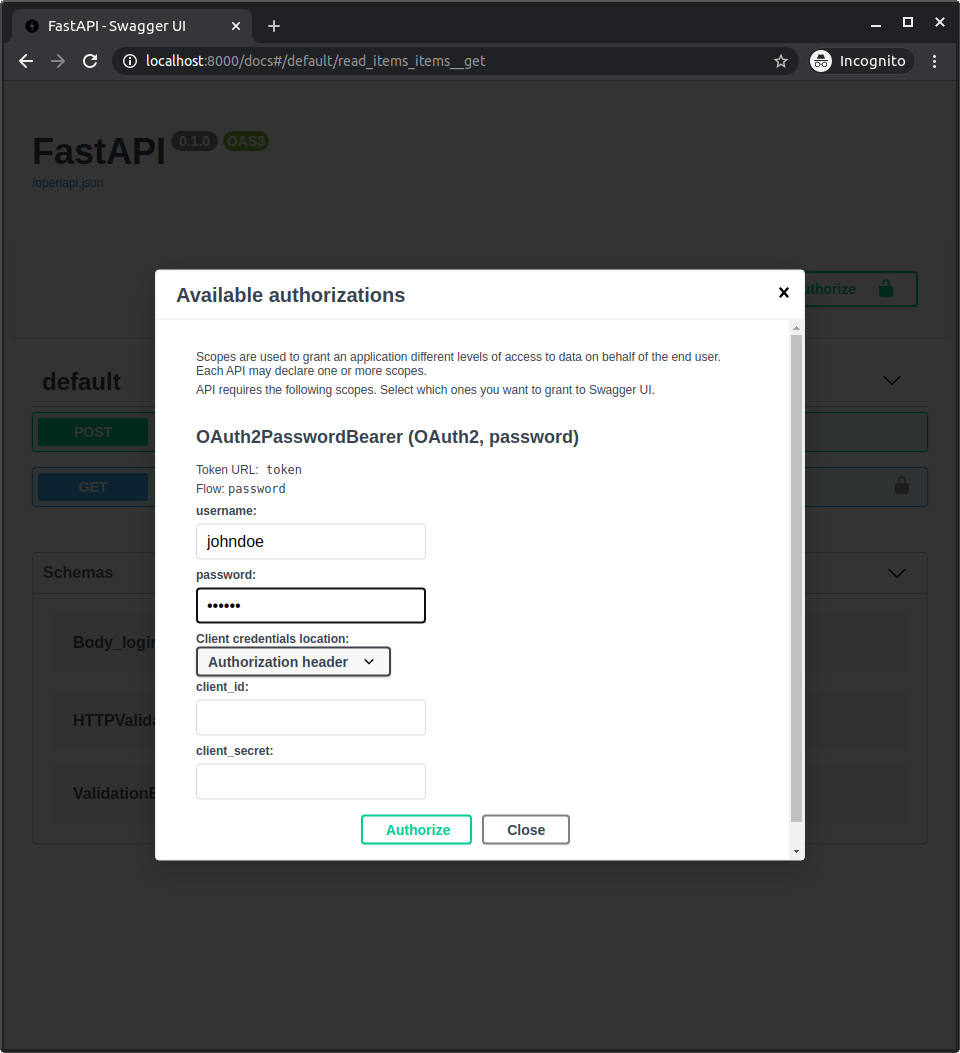
After authenticating in the system, you will see it like:
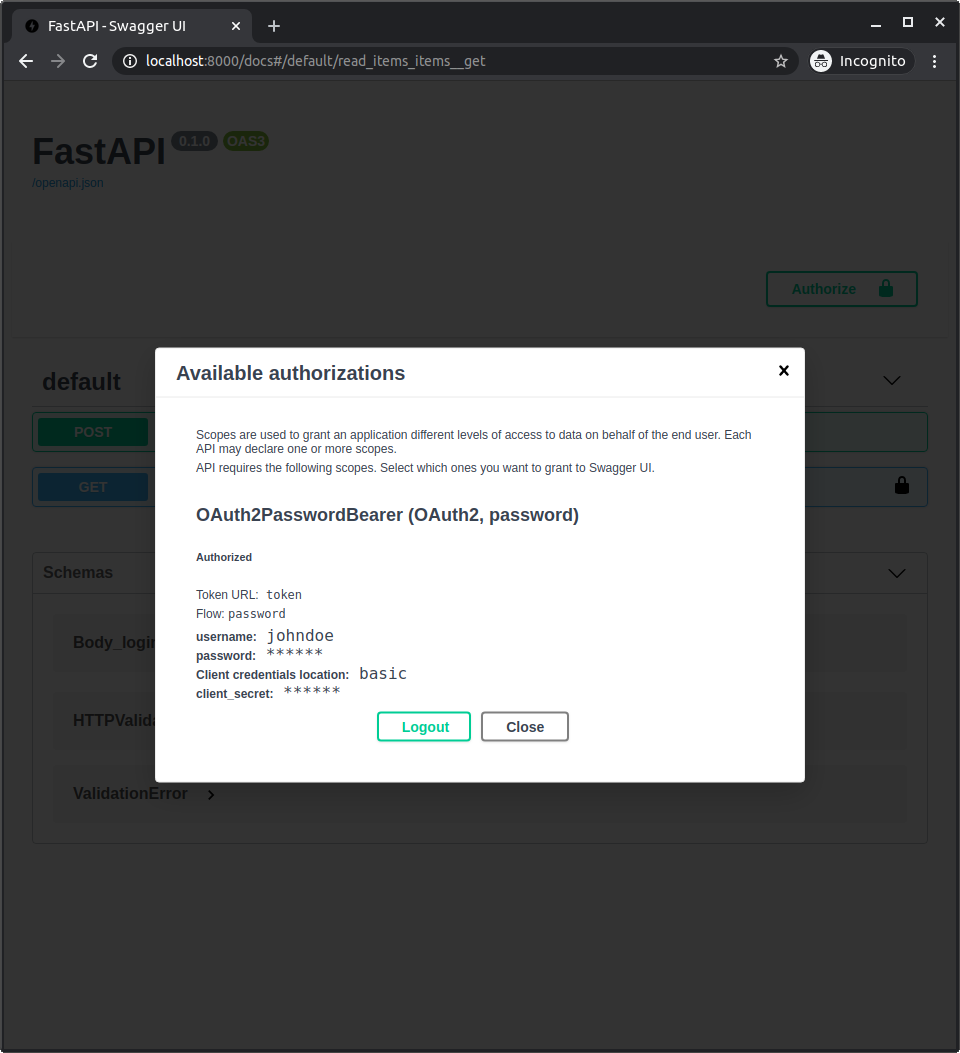
Get your own user data
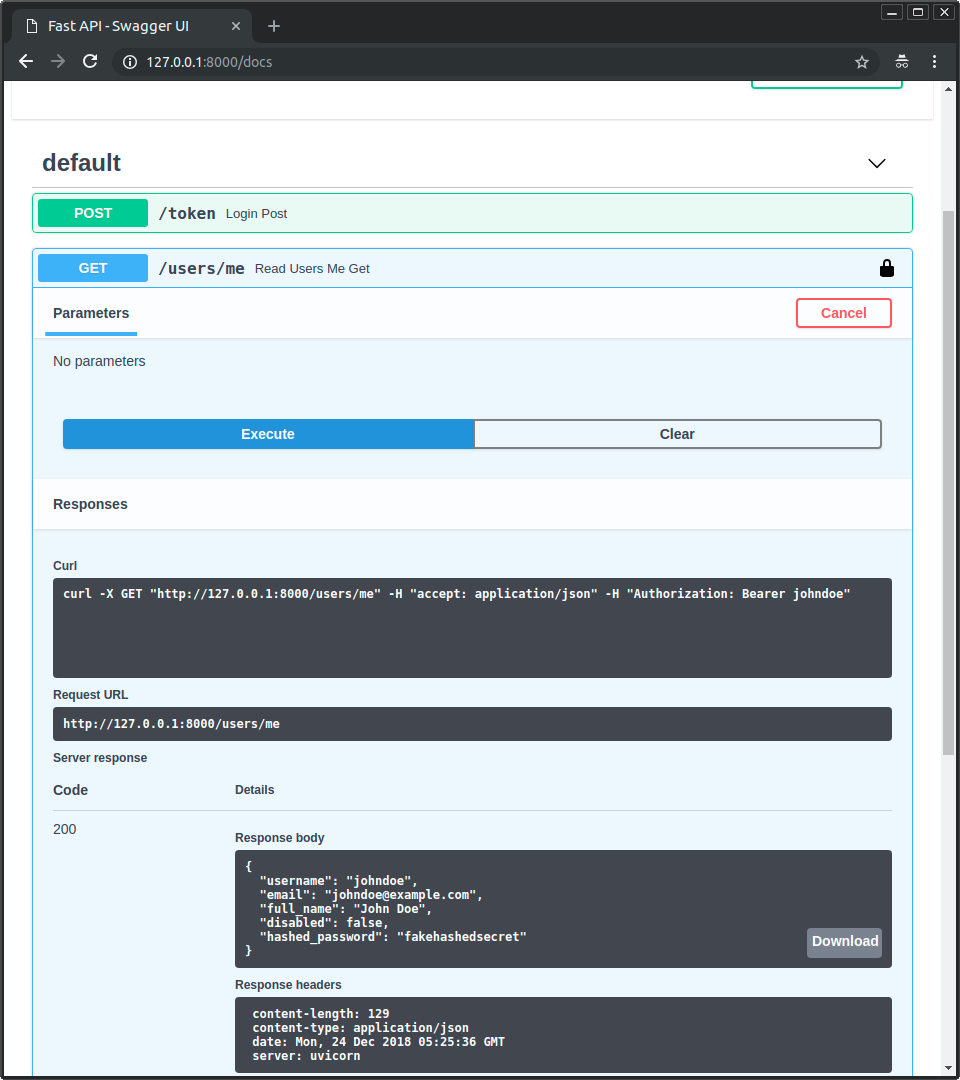
Section titled “Get your own user data”Now use the operation GET with the path /users/me.
You will get your user's data, like:
{
  "username": "johndoe",
  "email": "johndoe@example.com",
  "full_name": "John Doe",
  "disabled": false,
  "hashed_password": "fakehashedsecret"
}
If you click the lock icon and logout, and then try the same operation again, you will get an HTTP 401 error of:
{
  "detail": "Not authenticated"
}
Inactive user
Section titled “Inactive user”Now try with an inactive user, authenticate with:
User: alice
Password: secret2
And try to use the operation GET with the path /users/me.
You will get an "Inactive user" error, like:
{
  "detail": "Inactive user"
}You now have the tools to implement a complete security system based on username and password for your API.
Using these tools, you can make the security system compatible with any database and with any user or data model.
The only detail missing is that it is not actually "secure" yet.
In the next chapter you'll see how to use a secure password hashing library and JWTJSON Web Tokens tokens.