JSON with Bytes as Base64
If your app needs to receive and send JSON data, but you need to include binary data in it, you can encode it as base64.
Base64 vs Files
Section titled “Base64 vs Files”Consider first if you can use Request Files for uploading binary data and Custom Response - FileResponse for sending binary data, instead of encoding it in JSON.
JSON can only contain UTF-8 encoded strings, so it can't contain raw bytes.
Base64 can encode binary data in strings, but to do it, it needs to use more characters than the original binary data, so it would normally be less efficient than regular files.
Use base64 only if you definitely need to include binary data in JSON, and you can't use files for that.
Pydantic bytes
Section titled “Pydantic bytes”You can declare a Pydantic model with bytes fields, and then use val_json_bytes in the model config to tell it to use base64 to validate input JSON data, as part of that validation it will decode the base64 string into bytes.
from fastapi import FastAPI
from pydantic import BaseModel


class DataInput(BaseModel):
    description: str
    data: bytes

    model_config = {"val_json_bytes": "base64"}


class DataOutput(BaseModel):
    description: str
    data: bytes

    model_config = {"ser_json_bytes": "base64"}


class DataInputOutput(BaseModel):
    description: str
    data: bytes

    model_config = {
        "val_json_bytes": "base64",
        "ser_json_bytes": "base64",
    }


app = FastAPI()


@app.post("/data")
def post_data(body: DataInput):
    content = body.data.decode("utf-8")
    return {"description": body.description, "content": content}


@app.get("/data")
def get_data() -> DataOutput:
    data = "hello".encode("utf-8")
    return DataOutput(description="A plumbus", data=data)


@app.post("/data-in-out")
def post_data_in_out(body: DataInputOutput) -> DataInputOutput:
    return body
If you check the /docs, they will show that the field data expects base64 encoded bytes:
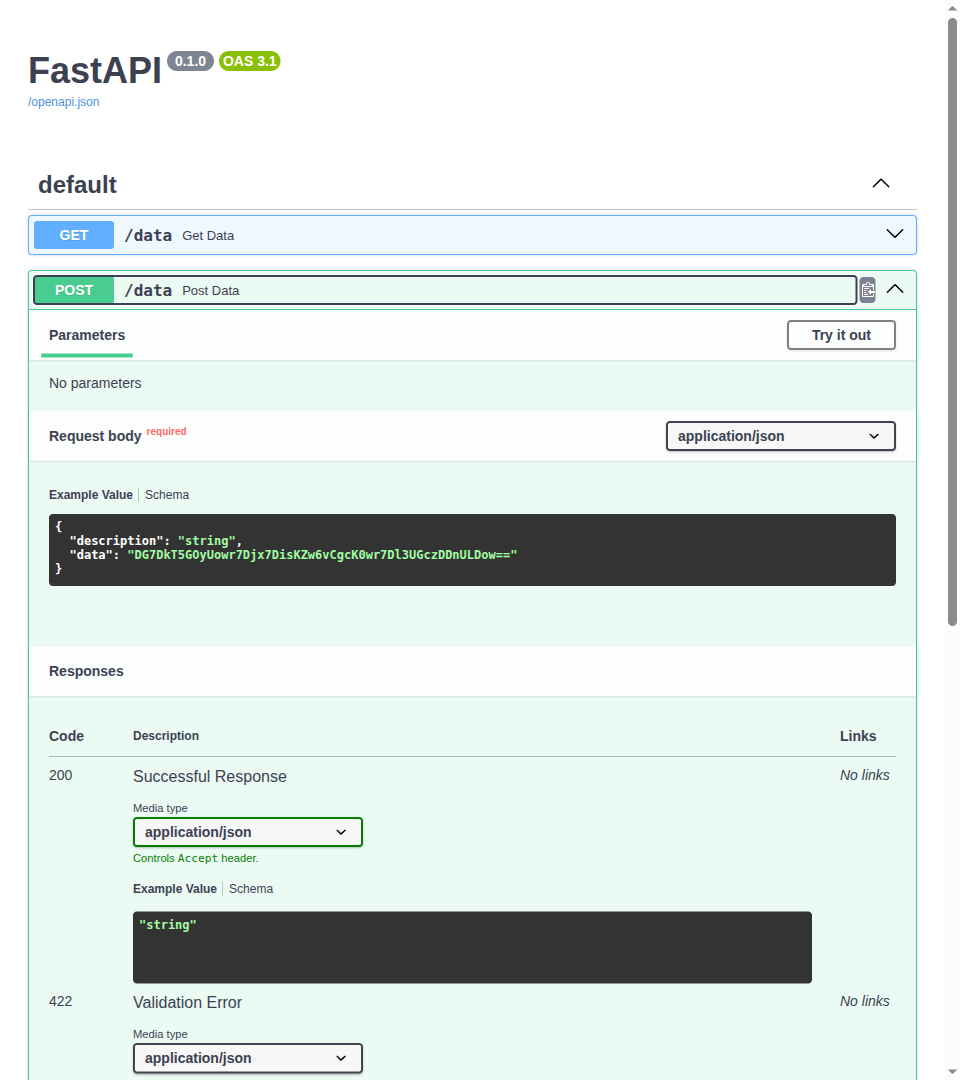
You could send a request like:
{
    "description": "Some data",
    "data": "aGVsbG8="
}And then Pydantic will decode the base64 string and give you the original bytes in the data field of the model.
You will receive a response like:
{
  "description": "Some data",
  "content": "hello"
}
Pydantic bytes for Output Data
Section titled “Pydantic bytes for Output Data”You can also use bytes fields with ser_json_bytes in the model config for output data, and Pydantic will serialize the bytes as base64 when generating the JSON response.
from fastapi import FastAPI
from pydantic import BaseModel


class DataInput(BaseModel):
    description: str
    data: bytes

    model_config = {"val_json_bytes": "base64"}


class DataOutput(BaseModel):
    description: str
    data: bytes

    model_config = {"ser_json_bytes": "base64"}


class DataInputOutput(BaseModel):
    description: str
    data: bytes

    model_config = {
        "val_json_bytes": "base64",
        "ser_json_bytes": "base64",
    }


app = FastAPI()


@app.post("/data")
def post_data(body: DataInput):
    content = body.data.decode("utf-8")
    return {"description": body.description, "content": content}


@app.get("/data")
def get_data() -> DataOutput:
    data = "hello".encode("utf-8")
    return DataOutput(description="A plumbus", data=data)


@app.post("/data-in-out")
def post_data_in_out(body: DataInputOutput) -> DataInputOutput:
    return body
Pydantic bytes for Input and Output Data
Section titled “Pydantic bytes for Input and Output Data”And of course, you can use the same model configured to use base64 to handle both input (validate) with val_json_bytes and output (serialize) with ser_json_bytes when receiving and sending JSON data.
from fastapi import FastAPI
from pydantic import BaseModel


class DataInput(BaseModel):
    description: str
    data: bytes

    model_config = {"val_json_bytes": "base64"}


class DataOutput(BaseModel):
    description: str
    data: bytes

    model_config = {"ser_json_bytes": "base64"}


class DataInputOutput(BaseModel):
    description: str
    data: bytes

    model_config = {
        "val_json_bytes": "base64",
        "ser_json_bytes": "base64",
    }


app = FastAPI()


@app.post("/data")
def post_data(body: DataInput):
    content = body.data.decode("utf-8")
    return {"description": body.description, "content": content}


@app.get("/data")
def get_data() -> DataOutput:
    data = "hello".encode("utf-8")
    return DataOutput(description="A plumbus", data=data)


@app.post("/data-in-out")
def post_data_in_out(body: DataInputOutput) -> DataInputOutput:
    return body