Path Operation Configuration
There are several parameters that you can pass to your path operation decorator to configure it.
Response Status Code
Section titled “Response Status Code”You can define the (HTTP) status_code to be used in the response of your path operation.
You can pass directly the int code, like 404.
But if you don't remember what each number code is for, you can use the shortcut constants in status:
from fastapi import FastAPI, status
from pydantic import BaseModel

app = FastAPI()


class Item(BaseModel):
    name: str
    description: str | None = None
    price: float
    tax: float | None = None
    tags: set[str] = set()


@app.post("/items/", status_code=status.HTTP_201_CREATED)
async def create_item(item: Item) -> Item:
    return item
That status code will be used in the response and will be added to the OpenAPI schema.
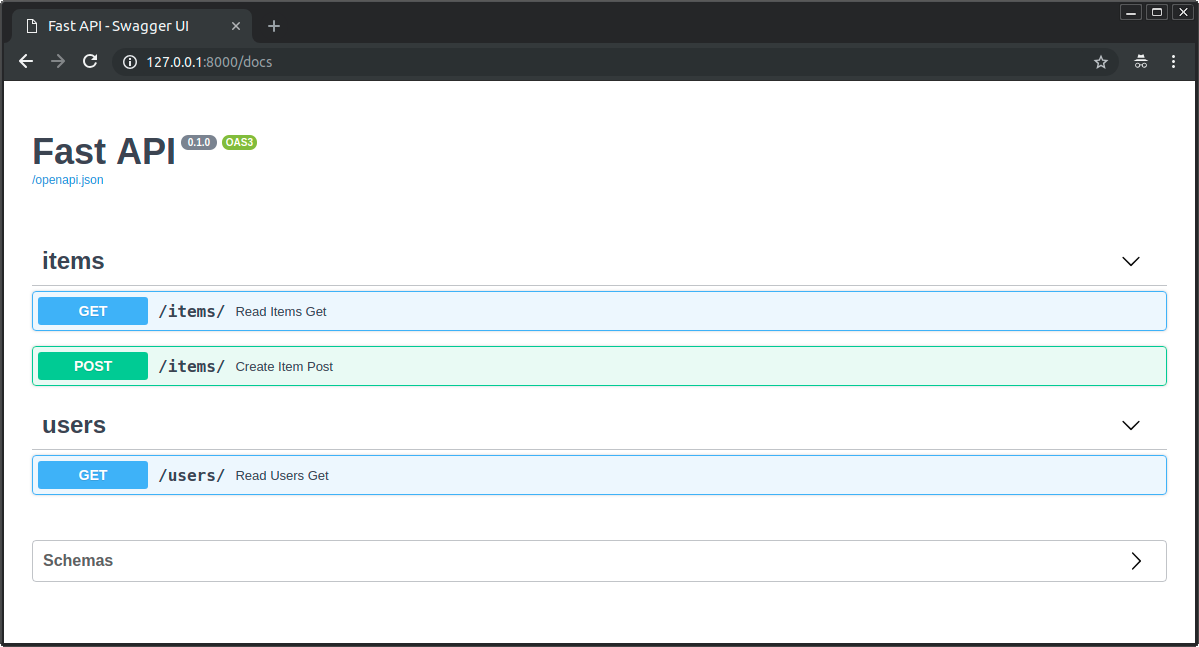
You can add tags to your path operation, pass the parameter tags with a list of str (commonly just one str):
from fastapi import FastAPI
from pydantic import BaseModel

app = FastAPI()


class Item(BaseModel):
    name: str
    description: str | None = None
    price: float
    tax: float | None = None
    tags: set[str] = set()


@app.post("/items/", tags=["items"])
async def create_item(item: Item) -> Item:
    return item


@app.get("/items/", tags=["items"])
async def read_items():
    return [{"name": "Foo", "price": 42}]


@app.get("/users/", tags=["users"])
async def read_users():
    return [{"username": "johndoe"}]
They will be added to the OpenAPI schema and used by the automatic documentation interfaces:
Tags with Enums
Section titled “Tags with Enums”If you have a big application, you might end up accumulating several tags, and you would want to make sure you always use the same tag for related path operations.
In these cases, it could make sense to store the tags in an Enum.
FastAPI supports that the same way as with plain strings:
from enum import Enum

from fastapi import FastAPI

app = FastAPI()


class Tags(Enum):
    items = "items"
    users = "users"


@app.get("/items/", tags=[Tags.items])
async def get_items():
    return ["Portal gun", "Plumbus"]


@app.get("/users/", tags=[Tags.users])
async def read_users():
    return ["Rick", "Morty"]
Summary and description
Section titled “Summary and description”You can add a summary and description:
from fastapi import FastAPI
from pydantic import BaseModel

app = FastAPI()


class Item(BaseModel):
    name: str
    description: str | None = None
    price: float
    tax: float | None = None
    tags: set[str] = set()


@app.post(
    "/items/",
    summary="Create an item",
    description="Create an item with all the information, name, description, price, tax and a set of unique tags",
)
async def create_item(item: Item) -> Item:
    return item
Description from docstring
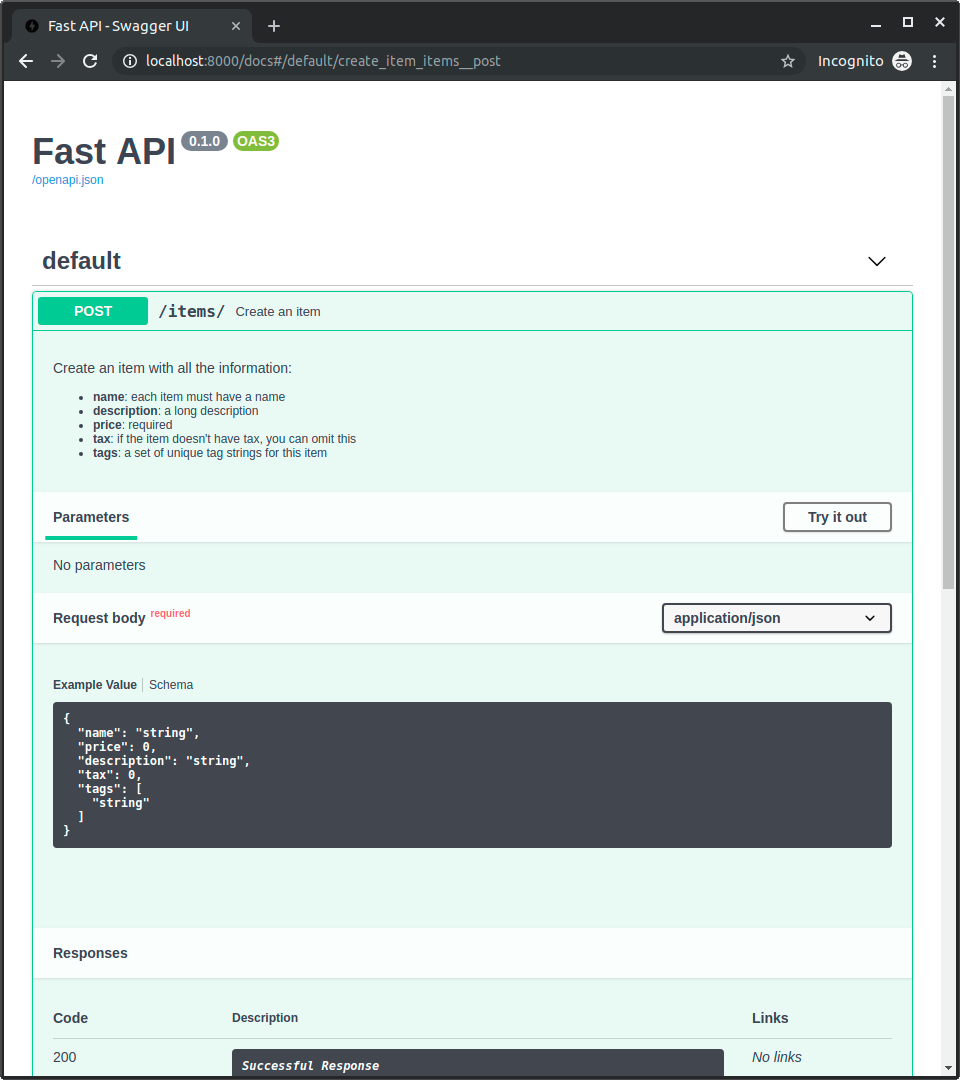
Section titled “Description from docstring”As descriptions tend to be long and cover multiple lines, you can declare the path operation description in the function docstring and FastAPI will read it from there.
You can write Markdown in the docstring, it will be interpreted and displayed correctly (taking into account docstring indentation).
from fastapi import FastAPI
from pydantic import BaseModel

app = FastAPI()


class Item(BaseModel):
    name: str
    description: str | None = None
    price: float
    tax: float | None = None
    tags: set[str] = set()


@app.post("/items/", summary="Create an item")
async def create_item(item: Item) -> Item:
    """
    Create an item with all the information:

    - **name**: each item must have a name
    - **description**: a long description
    - **price**: required
    - **tax**: if the item doesn't have tax, you can omit this
    - **tags**: a set of unique tag strings for this item
    """
    return item
It will be used in the interactive docs:
Response description
Section titled “Response description”You can specify the response description with the parameter response_description:
from fastapi import FastAPI
from pydantic import BaseModel

app = FastAPI()


class Item(BaseModel):
    name: str
    description: str | None = None
    price: float
    tax: float | None = None
    tags: set[str] = set()


@app.post(
    "/items/",
    summary="Create an item",
    response_description="The created item",
)
async def create_item(item: Item) -> Item:
    """
    Create an item with all the information:

    - **name**: each item must have a name
    - **description**: a long description
    - **price**: required
    - **tax**: if the item doesn't have tax, you can omit this
    - **tags**: a set of unique tag strings for this item
    """
    return item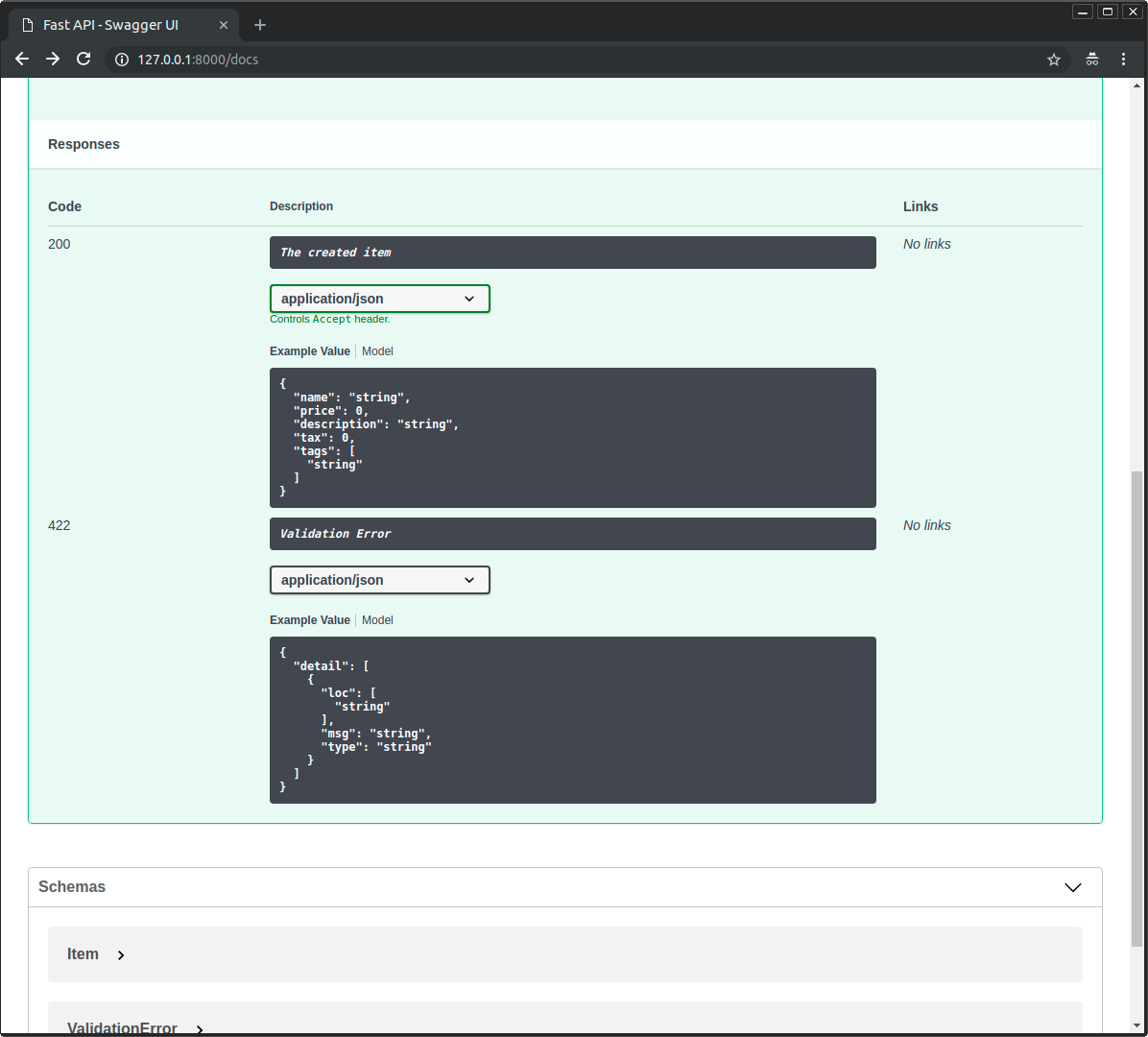
Deprecate a path operation
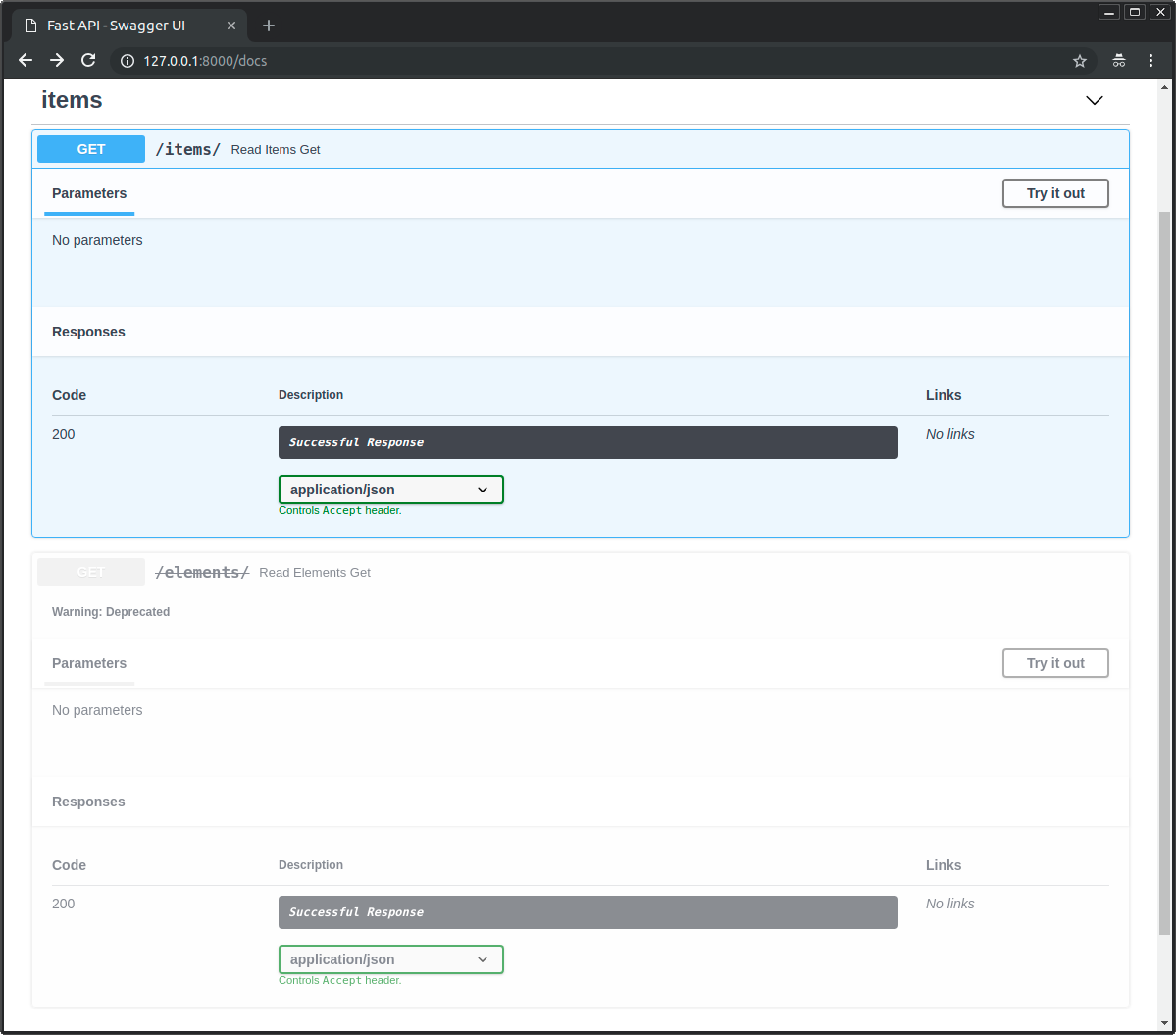
Section titled “Deprecate a path operation”If you need to mark a path operation as deprecated, but without removing it, pass the parameter deprecated:
from fastapi import FastAPI

app = FastAPI()


@app.get("/items/", tags=["items"])
async def read_items():
    return [{"name": "Foo", "price": 42}]


@app.get("/users/", tags=["users"])
async def read_users():
    return [{"username": "johndoe"}]


@app.get("/elements/", tags=["items"], deprecated=True)
async def read_elements():
    return [{"item_id": "Foo"}]
It will be clearly marked as deprecated in the interactive docs:
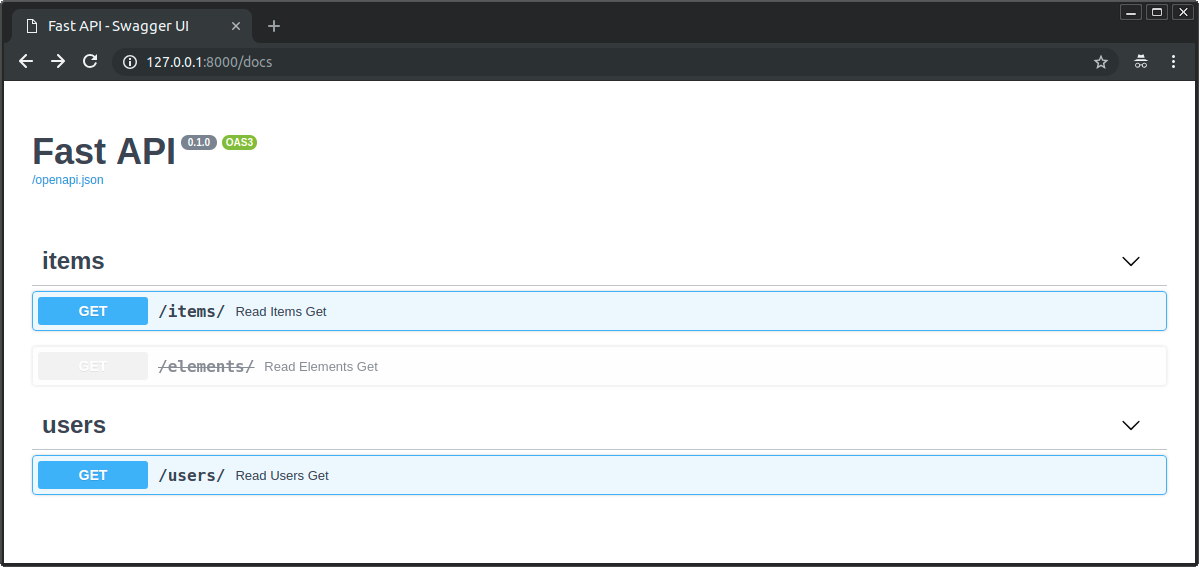
Check how deprecated and non-deprecated path operations look:
You can configure and add metadata for your path operations easily by passing parameters to the path operation decorators.