Extending OpenAPI
There are some cases where you might need to modify the generated OpenAPI schema.
In this section you will see how.
The normal process
Section titled “The normal process”The normal (default) process, is as follows.
A FastAPI application (instance) has an .openapi() method that is expected to return the OpenAPI schema.
As part of the application object creation, a path operation for /openapi.json (or for whatever you set your openapi_url) is registered.
It just returns a JSON response with the result of the application's .openapi() method.
By default, what the method .openapi() does is check the property .openapi_schema to see if it has contents and return them.
If it doesn't, it generates them using the utility function at fastapi.openapi.utils.get_openapi.
And that function get_openapi() receives as parameters:
title: The OpenAPI title, shown in the docs.version: The version of your API, e.g.2.5.0.openapi_version: The version of the OpenAPI specification used. By default, the latest:3.1.0.summary: A short summary of the API.description: The description of your API, this can include markdown and will be shown in the docs.routes: The routes from the application, taken fromapp.routes. FastAPI uses them to collect the registered path operations, including those from included routers.
Overriding the defaults
Section titled “Overriding the defaults”Using the information above, you can use the same utility function to generate the OpenAPI schema and override each part that you need.
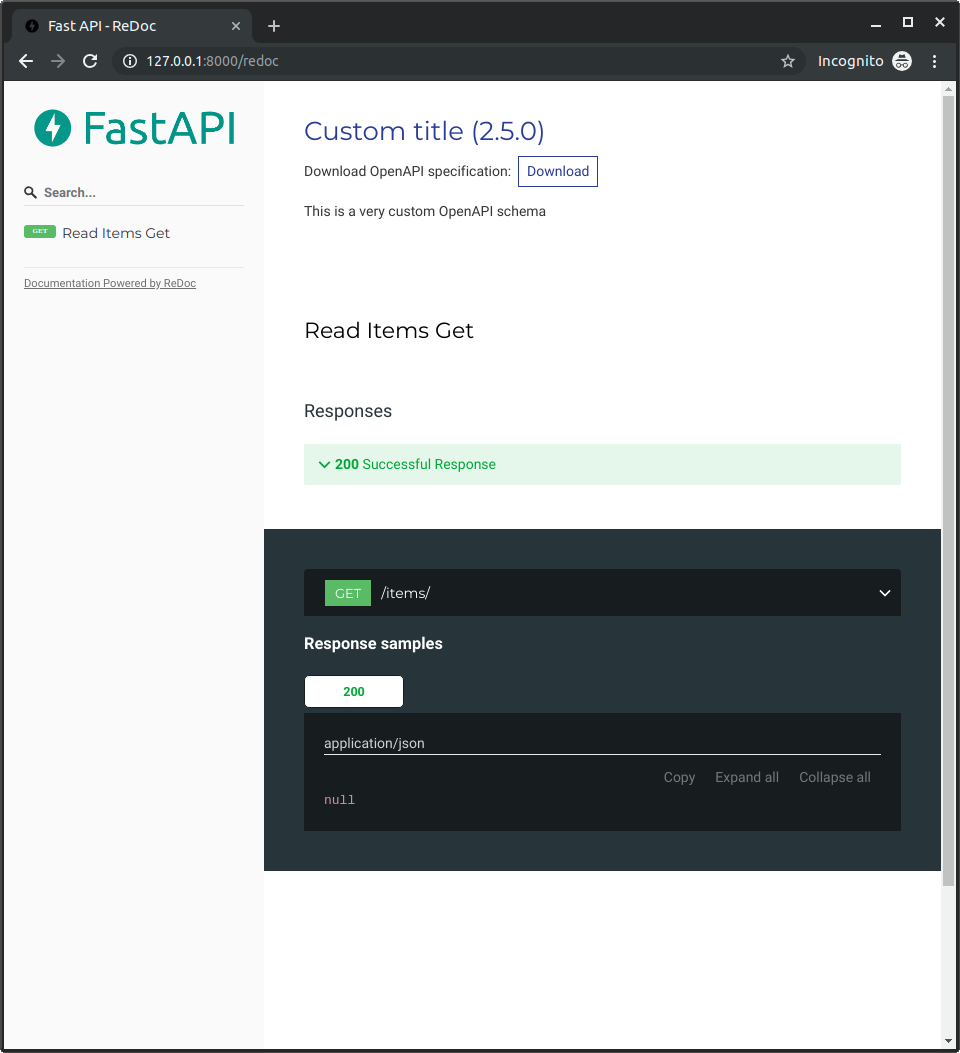
For example, let's add ReDoc's OpenAPI extension to include a custom logo.
Normal FastAPI
Section titled “Normal FastAPI”First, write all your FastAPI application as normally:
from fastapi import FastAPI
from fastapi.openapi.utils import get_openapi

app = FastAPI()


@app.get("/items/")
async def read_items():
    return [{"name": "Foo"}]


def custom_openapi():
    if app.openapi_schema:
        return app.openapi_schema
    openapi_schema = get_openapi(
        title="Custom title",
        version="2.5.0",
        summary="This is a very custom OpenAPI schema",
        description="Here's a longer description of the custom **OpenAPI** schema",
        routes=app.routes,
    )
    openapi_schema["info"]["x-logo"] = {
        "url": "https://fastapi.tiangolo.com/img/logo-margin/logo-teal.png"
    }
    app.openapi_schema = openapi_schema
    return app.openapi_schema


app.openapi = custom_openapi
Generate the OpenAPI schema
Section titled “Generate the OpenAPI schema”Then, use the same utility function to generate the OpenAPI schema, inside a custom_openapi() function:
from fastapi import FastAPI
from fastapi.openapi.utils import get_openapi

app = FastAPI()


@app.get("/items/")
async def read_items():
    return [{"name": "Foo"}]


def custom_openapi():
    if app.openapi_schema:
        return app.openapi_schema
    openapi_schema = get_openapi(
        title="Custom title",
        version="2.5.0",
        summary="This is a very custom OpenAPI schema",
        description="Here's a longer description of the custom **OpenAPI** schema",
        routes=app.routes,
    )
    openapi_schema["info"]["x-logo"] = {
        "url": "https://fastapi.tiangolo.com/img/logo-margin/logo-teal.png"
    }
    app.openapi_schema = openapi_schema
    return app.openapi_schema


app.openapi = custom_openapi
Modify the OpenAPI schema
Section titled “Modify the OpenAPI schema”Now you can add the ReDoc extension, adding a custom x-logo to the info "object" in the OpenAPI schema:
from fastapi import FastAPI
from fastapi.openapi.utils import get_openapi

app = FastAPI()


@app.get("/items/")
async def read_items():
    return [{"name": "Foo"}]


def custom_openapi():
    if app.openapi_schema:
        return app.openapi_schema
    openapi_schema = get_openapi(
        title="Custom title",
        version="2.5.0",
        summary="This is a very custom OpenAPI schema",
        description="Here's a longer description of the custom **OpenAPI** schema",
        routes=app.routes,
    )
    openapi_schema["info"]["x-logo"] = {
        "url": "https://fastapi.tiangolo.com/img/logo-margin/logo-teal.png"
    }
    app.openapi_schema = openapi_schema
    return app.openapi_schema


app.openapi = custom_openapi
Cache the OpenAPI schema
Section titled “Cache the OpenAPI schema”You can use the property .openapi_schema as a "cache", to store your generated schema.
That way, your application won't have to generate the schema every time a user opens your API docs.
It will be generated only once, and then the same cached schema will be used for the next requests.
from fastapi import FastAPI
from fastapi.openapi.utils import get_openapi

app = FastAPI()


@app.get("/items/")
async def read_items():
    return [{"name": "Foo"}]


def custom_openapi():
    if app.openapi_schema:
        return app.openapi_schema
    openapi_schema = get_openapi(
        title="Custom title",
        version="2.5.0",
        summary="This is a very custom OpenAPI schema",
        description="Here's a longer description of the custom **OpenAPI** schema",
        routes=app.routes,
    )
    openapi_schema["info"]["x-logo"] = {
        "url": "https://fastapi.tiangolo.com/img/logo-margin/logo-teal.png"
    }
    app.openapi_schema = openapi_schema
    return app.openapi_schema


app.openapi = custom_openapi
Override the method
Section titled “Override the method”Now you can replace the .openapi() method with your new function.
from fastapi import FastAPI
from fastapi.openapi.utils import get_openapi

app = FastAPI()


@app.get("/items/")
async def read_items():
    return [{"name": "Foo"}]


def custom_openapi():
    if app.openapi_schema:
        return app.openapi_schema
    openapi_schema = get_openapi(
        title="Custom title",
        version="2.5.0",
        summary="This is a very custom OpenAPI schema",
        description="Here's a longer description of the custom **OpenAPI** schema",
        routes=app.routes,
    )
    openapi_schema["info"]["x-logo"] = {
        "url": "https://fastapi.tiangolo.com/img/logo-margin/logo-teal.png"
    }
    app.openapi_schema = openapi_schema
    return app.openapi_schema


app.openapi = custom_openapi
Check it
Section titled “Check it”Once you go to http://127.0.0.1:8000/redoc you will see that you are using your custom logo (in this example, FastAPI's logo):