Path Operation Advanced Configuration
OpenAPI operationId
Section titled “OpenAPI operationId”You can set the OpenAPI operationId to be used in your path operation with the parameter operation_id.
You would have to make sure that it is unique for each operation.
from fastapi import FastAPI

app = FastAPI()


@app.get("/items/", operation_id="some_specific_id_you_define")
async def read_items():
    return [{"item_id": "Foo"}]
Using the path operation function name as the operationId
Section titled “Using the path operation function name as the operationId”If you want to use your APIs' function names as operationIds, you can pass a custom generate_unique_id_function to FastAPI.
The function receives each APIRoute and returns the operationId to use for that path operation.
from fastapi import FastAPI
from fastapi.routing import APIRoute


def custom_generate_unique_id(route: APIRoute) -> str:
    return route.name


app = FastAPI(generate_unique_id_function=custom_generate_unique_id)


@app.get("/items/")
async def read_items():
return [{"item_id": "Foo"}]Exclude from OpenAPI
Section titled “Exclude from OpenAPI”To exclude a path operation from the generated OpenAPI schema (and thus, from the automatic documentation systems), use the parameter include_in_schema and set it to False:
from fastapi import FastAPI

app = FastAPI()


@app.get("/items/", include_in_schema=False)
async def read_items():
    return [{"item_id": "Foo"}]
Advanced description from docstring
Section titled “Advanced description from docstring”You can limit the lines used from the docstring of a path operation function for OpenAPI.
Adding an \f (an escaped "form feed" character) causes FastAPI to truncate the output used for OpenAPI at this point.
It won't show up in the documentation, but other tools (such as Sphinx) will be able to use the rest.
from fastapi import FastAPI
from pydantic import BaseModel

app = FastAPI()


class Item(BaseModel):
    name: str
    description: str | None = None
    price: float
    tax: float | None = None
    tags: set[str] = set()


@app.post("/items/", summary="Create an item")
async def create_item(item: Item) -> Item:
    """
    Create an item with all the information:

    - **name**: each item must have a name
    - **description**: a long description
    - **price**: required
    - **tax**: if the item doesn't have tax, you can omit this
    - **tags**: a set of unique tag strings for this item
    \f
    :param item: User input.
    """
    return item
Additional Responses
Section titled “Additional Responses”You probably have seen how to declare the response_model and status_code for a path operation.
That defines the metadata about the main response of a path operation.
You can also declare additional responses with their models, status codes, etc.
There's a whole chapter here in the documentation about it, you can read it at Additional Responses in OpenAPI.
OpenAPI Extra
Section titled “OpenAPI Extra”When you declare a path operation in your application, FastAPI automatically generates the relevant metadata about that path operation to be included in the OpenAPI schema.
It has all the information about the path operation and is used to generate the automatic documentation.
It includes the tags, parameters, requestBody, responses, etc.
This path operation-specific OpenAPI schema is normally generated automatically by FastAPI, but you can also extend it.
You can extend the OpenAPI schema for a path operation using the parameter openapi_extra.
OpenAPI Extensions
Section titled “OpenAPI Extensions”This openapi_extra can be helpful, for example, to declare OpenAPI Extensions:
from fastapi import FastAPI

app = FastAPI()


@app.get("/items/", openapi_extra={"x-aperture-labs-portal": "blue"})
async def read_items():
    return [{"item_id": "portal-gun"}]
If you open the automatic API docs, your extension will show up at the bottom of the specific path operation.
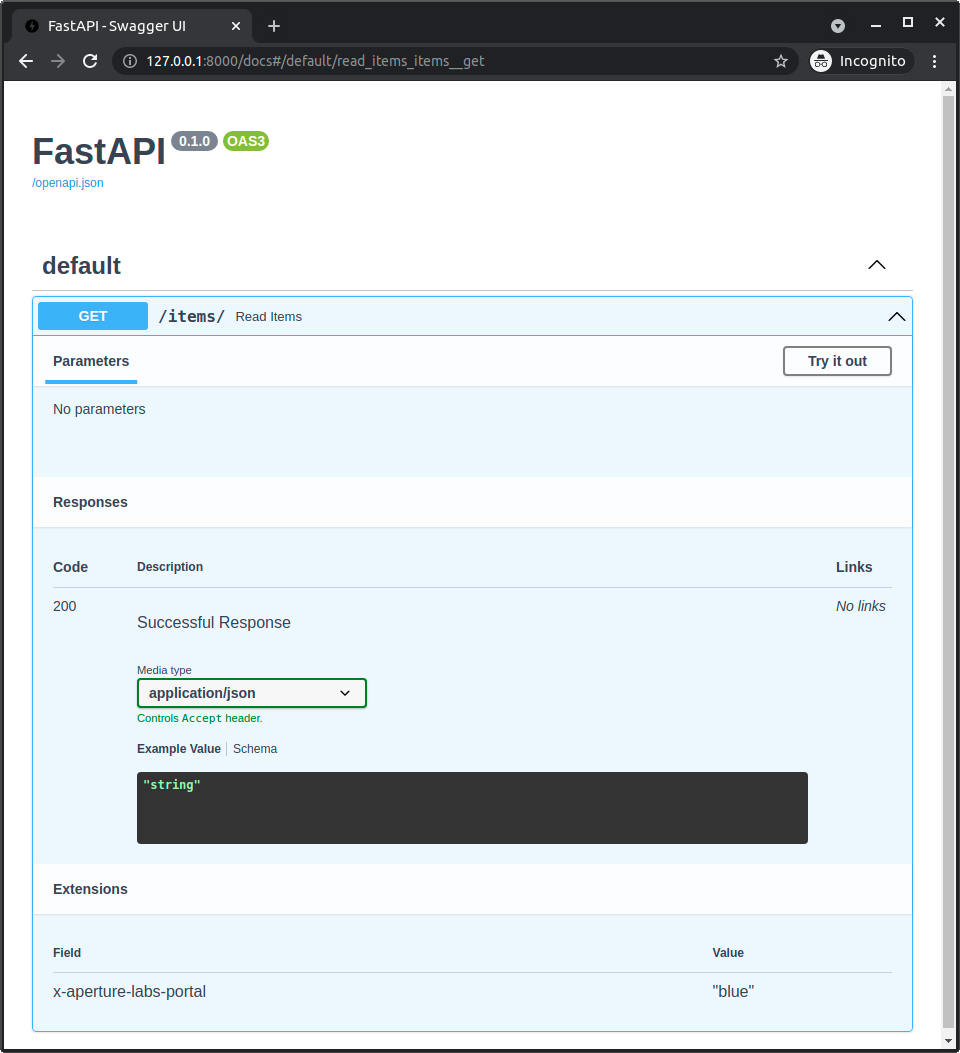
And if you see the resulting OpenAPI (at /openapi.json in your API), you will see your extension as part of the specific path operation too:
{ "openapi": "3.1.0", "info": { "title": "FastAPI", "version": "0.1.0" }, "paths": { "/items/": { "get": { "summary": "Read Items", "operationId": "read_items_items__get", "responses": { "200": { "description": "Successful Response", "content": { "application/json": { "schema": {} } } } }, "x-aperture-labs-portal": "blue" } } }}Custom OpenAPI path operation schema
Section titled “Custom OpenAPI path operation schema”The dictionary in openapi_extra will be deeply merged with the automatically generated OpenAPI schema for the path operation.
So, you could add additional data to the automatically generated schema.
For example, you could decide to read and validate the request with your own code, without using the automatic features of FastAPI with Pydantic, but you could still want to define the request in the OpenAPI schema.
You could do that with openapi_extra:
from fastapi import FastAPI, Request

app = FastAPI()


def magic_data_reader(raw_body: bytes):
    return {
        "size": len(raw_body),
        "content": {
            "name": "Maaaagic",
            "price": 42,
            "description": "Just kiddin', no magic here. ✨",
        },
    }


@app.post(
    "/items/",
    openapi_extra={
        "requestBody": {
            "content": {
                "application/json": {
                    "schema": {
                        "required": ["name", "price"],
                        "type": "object",
                        "properties": {
                            "name": {"type": "string"},
                            "price": {"type": "number"},
                            "description": {"type": "string"},
                        },
                    }
                }
            },
            "required": True,
        },
    },
)
async def create_item(request: Request):
    raw_body = await request.body()
    data = magic_data_reader(raw_body)
    return data
In this example, we didn't declare any Pydantic model. In fact, the request body is not even parsed as JSON, it is read directly as bytes, and the function magic_data_reader() would be in charge of parsing it in some way.
Nevertheless, we can declare the expected schema for the request body.
Custom OpenAPI content type
Section titled “Custom OpenAPI content type”Using this same trick, you could use a Pydantic model to define the JSON Schema that is then included in the custom OpenAPI schema section for the path operation.
And you could do this even if the data type in the request is not JSON.
For example, in this application we don't use FastAPI's integrated functionality to extract the JSON Schema from Pydantic models nor the automatic validation for JSON. In fact, we are declaring the request content type as YAML, not JSON:
import yaml
from fastapi import FastAPI, HTTPException, Request
from pydantic import BaseModel, ValidationError

app = FastAPI()


class Item(BaseModel):
    name: str
    tags: list[str]


@app.post(
    "/items/",
    openapi_extra={
        "requestBody": {
            "content": {"application/x-yaml": {"schema": Item.model_json_schema()}},
            "required": True,
        },
    },
)
async def create_item(request: Request):
    raw_body = await request.body()
    try:
        data = yaml.safe_load(raw_body)
    except yaml.YAMLError:
        raise HTTPException(status_code=422, detail="Invalid YAML")
    try:
        item = Item.model_validate(data)
    except ValidationError as e:
        raise HTTPException(status_code=422, detail=e.errors(include_url=False))
    return item
Nevertheless, although we are not using the default integrated functionality, we are still using a Pydantic model to manually generate the JSON Schema for the data that we want to receive in YAML.
Then we use the request directly, and extract the body as bytes. This means that FastAPI won't even try to parse the request payload as JSON.
And then in our code, we parse that YAML content directly, and then we are again using the same Pydantic model to validate the YAML content:
import yaml
from fastapi import FastAPI, HTTPException, Request
from pydantic import BaseModel, ValidationError

app = FastAPI()


class Item(BaseModel):
    name: str
    tags: list[str]


@app.post(
    "/items/",
    openapi_extra={
        "requestBody": {
            "content": {"application/x-yaml": {"schema": Item.model_json_schema()}},
            "required": True,
        },
    },
)
async def create_item(request: Request):
    raw_body = await request.body()
    try:
        data = yaml.safe_load(raw_body)
    except yaml.YAMLError:
        raise HTTPException(status_code=422, detail="Invalid YAML")
    try:
        item = Item.model_validate(data)
    except ValidationError as e:
        raise HTTPException(status_code=422, detail=e.errors(include_url=False))
    return item